
Getting Started
How It Works
Section titled “How It Works”In collaboration with statichost, we implemented a custom integration to provide a seamless Pages experience.
When you enable “Pages” in the dedicated repository setting panel, CodeFloe creates a “site” on statichost1 which will, by default, point to the pages branch.
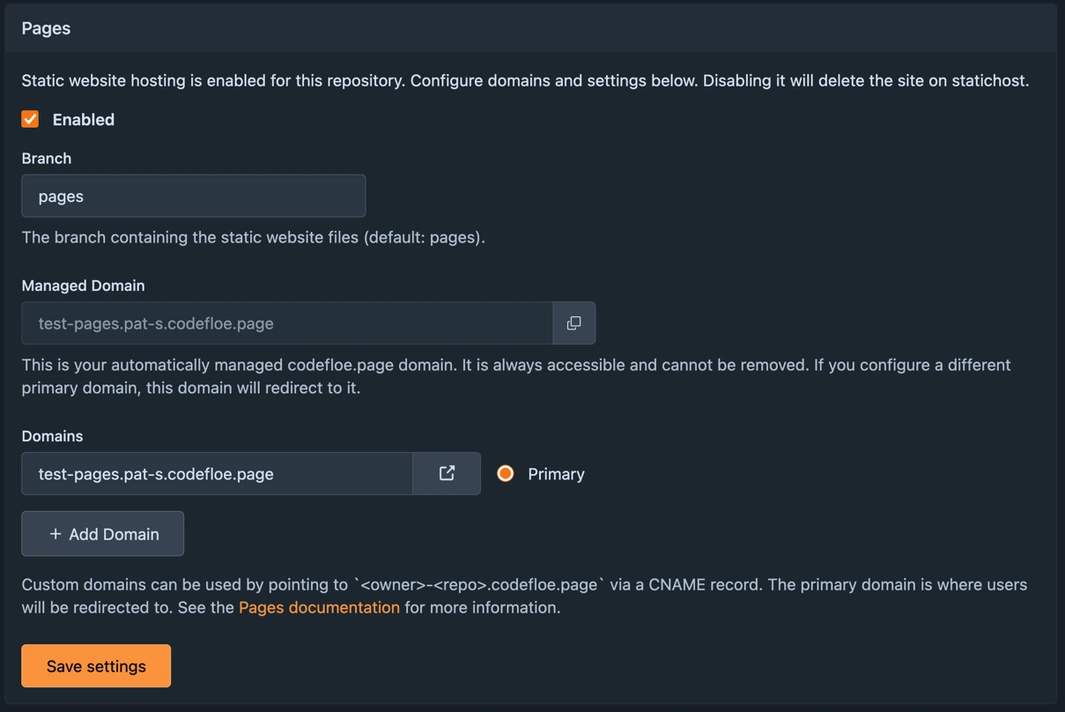
Statichost then attempts to serve the contents in the branch as static content.
Enabling Pages
Section titled “Enabling Pages”To enable Pages for your repository:
-
Navigate to your repository’s Settings
-
Find the Pages section
-
Toggle the Pages feature on
-
Select your branch (defaults to
pages) -
Click Save
Your site will be automatically created and deployed!
Default Configuration
Section titled “Default Configuration”When you enable Pages, CodeFloe automatically creates a pages branch (if it doesn’t exist) with a default statichost.yml configuration file:
# container image to use for building
image: alpine:latest
# Build command
command: "echo 'Deploy'"
# Public directory
public: .
This default configuration serves files directly from the root of your branch without any build process.
Disabling Pages
Section titled “Disabling Pages”When the “Pages” feature gets disabled in your repository settings, the respective site will be deleted on statichost automatically.
Next Steps
Section titled “Next Steps”- Configuration - Learn how to customize your build process and domains
- Technical Details - Understand the infrastructure and limits
Footnotes
Section titled “Footnotes”-
It is not possible to access this statichost “site” of yours directly. It is provisioned under a central “codefloe” team account. If you want to do so, you need to create a personal account on statichost and deploy your website on your own. This might change in the future, but we can’t make any promises right now. ↩